V2Ray Setup Guide: How to Set Up V2Ray on Android, iPhone, Windows & macOS
Learn how to set up V2Ray and Xray clients, import a VLESS or VMess configuration, and connect on Android, iPhone, Windows, and macOS.
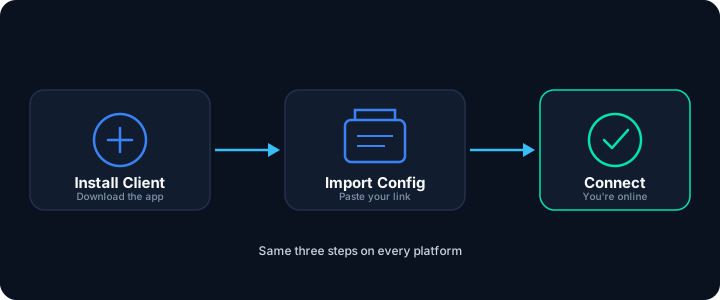
- 1. Install a client: Download a compatible V2Ray client app for your device.
- 2. Import your config: Copy your
vless://orvmess://link, or scan a QR code. - 3. Connect: Select the server profile and turn the connection on.
What You Need Before Setting Up V2Ray
To establish an active V2Ray connection, make sure you have these ready:
- A compatible V2Ray client app, downloaded from an official source.
- A valid configuration, provided as a link (
vless://,vmess://,trojan://), a QR code, or a subscription link. - An active internet connection, needed for the initial connection to the remote server.
How to Import a V2Ray Config
Client apps accept configurations in four common ways.
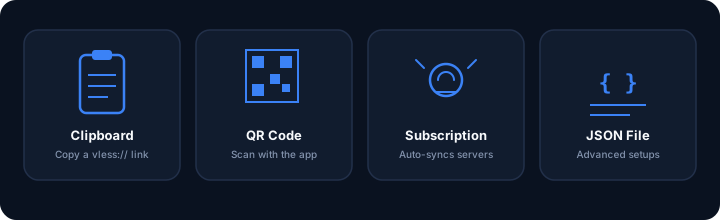
Clipboard Import
Copy your vless:// link, open the app, and choose "Import from Clipboard".
QR Code Scanning
Use the app's built-in camera tool to scan a config QR code directly.
Subscription Links
Add a subscription link to sync multiple server locations automatically.
Custom JSON Files
Import a structured .json file for advanced routing setups.
V2Ray Config Example: Structure Explained
A V2Ray config compresses connection details into one link (see our V2Ray config guide for a full explanation). Here is an example of a VLESS link:
vless://[email protected]:443?security=tls&type=ws&path=%2Fv2ray-stream#RapidPing-Server| Part of the Link | What It Means |
|---|---|
| vless:// | The proxy protocol being used (VLESS). |
| a1b2c3d4-... | Your unique ID, used to authenticate you to the server. |
| server.example.com | The server's address. |
| 443 | The port number (443 is the standard HTTPS port). |
| security=tls | The security/transport security setting used for the connection. |
| type=ws | The transport method (WebSocket in this example). |
| path=%2Fv2ray-stream | The WebSocket path used by the server. |
VLESS vs VMess vs Trojan
Modern V2Ray clients support a few different protocols, depending on the server.
| Protocol | What It's Good For | Overhead |
|---|---|---|
| VLESS | A lightweight protocol commonly used with modern Xray setups, including REALITY. | Very low |
| VMess | The original V2Ray protocol, still used on many older server setups. | Moderate |
| Trojan | Carries traffic over TLS so it resembles ordinary HTTPS browsing. | Low to moderate |
Most modern Xray setups use VLESS, since it has less overhead and works well with newer transports like REALITY.
What Is Xray and What Is REALITY?
- V2Ray: The original proxy framework and routing engine.
- Xray: A compatible fork of V2Ray (Project V) with extra performance improvements and newer protocol support.
- REALITY: A transport used with Xray that is designed to make the connection resemble ordinary TLS traffic while authenticating the connection without a conventional server certificate.
For more background on how these technologies compare to other proxy protocols, see our V2Ray vs Shadowsocks guide.
How to Set Up V2Ray on Android
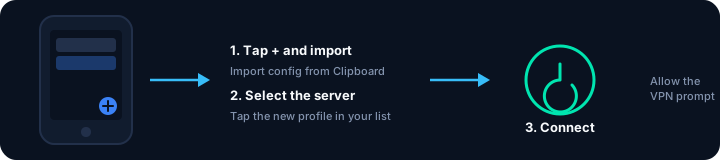
Recommended client: v2rayNG
- Download and open v2rayNG.
- Copy your
vless://orvmess://link to your clipboard. - Tap the + icon in the top-right corner.
- Select Import config from Clipboard.
- Tap the new server profile to select it.
- Tap the Connect button at the bottom right.
- When Android asks to set up a VPN connection, tap Allow.
How to Set Up V2Ray on iPhone (iOS)
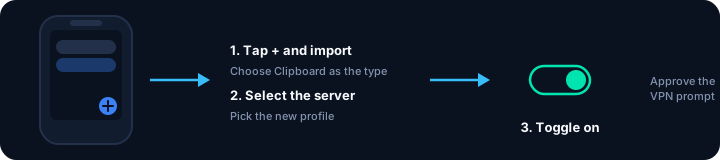
Recommended client: Shadowrocket
- Copy your V2Ray config link.
- Open Shadowrocket.
- Tap the + icon.
- Select Clipboard as the import type.
- Select the new server from your list.
- Toggle the connection switch on.
- Approve the system prompt to add a VPN configuration.
How to Set Up V2Ray on Windows
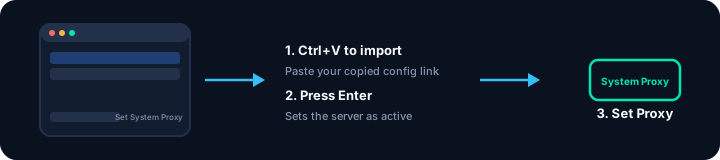
Recommended client: v2rayN
- Extract the downloaded folder and run
v2rayN.exe. - Copy your V2Ray config link to your clipboard.
- In v2rayN, press Ctrl+V to import the link.
- Click the new server and press Enter to set it active.
- At the bottom, change System Proxy to Set System Proxy.
- Optional: turn on TUN Mode to route all system traffic.
For a broader look at setting up on Windows, see our VPN for Windows guide.
How to Set Up V2Ray on macOS
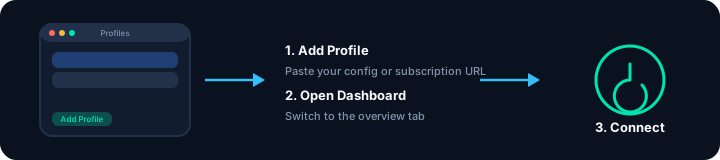
Recommended clients: Sing-box or v2rayA
- Open your client and go to Profiles.
- Click Add Profile and paste your config or subscription link.
- Save, then open the Dashboard tab.
- Turn the connection switch on.
- Approve any system permission prompts for the network extension.
For more detail, see our VPN for macOS guide.
Which V2Ray Configuration Should You Use?
- VLESS-REALITY: Good for more restrictive networks that block or throttle ordinary VPN traffic.
- VLESS with TLS: A solid general-purpose option with low overhead.
- WireGuard: Best when you want maximum speed, such as for gaming.
- Subscription links: Convenient when you want several server locations kept up to date automatically.
RapidPing provides both V2Ray/Xray (VLESS-REALITY) and WireGuard configs, so you can switch between them depending on your network.
How to Check if V2Ray Is Working
- Disconnect V2Ray in your app.
- Check your original IP using a site like
ipinfo.io, and note it down. - Connect V2Ray again in your client app.
- Refresh the IP check page. Your address should now match the server you connected to.
Common V2Ray Connection Problems
Connected, but sites won't load
Usually a DNS or local proxy setting issue.
- Turn on TUN Mode if your app has it.
- Try a public DNS resolver, such as 1.1.1.1 or 8.8.8.8, if it's reachable on your network.
- Restart your browser to clear old connections.
Works on Wi-Fi, not on mobile data
Mobile carriers sometimes filter certain ports.
- Switch the transport to gRPC or WebSocket in your config.
- Check your phone's APN settings for a carrier-added proxy.
Config won't import
Usually caused by an incomplete copied link.
- Make sure the link starts cleanly with
vless://, with no extra spaces. - Confirm your app supports VLESS and Xray configs.
REALITY handshake fails
Often related to device clock or network blocking.
- Make sure your device's clock is accurate.
- Confirm the server's port (usually 443) is reachable on your network.
Connected, but your IP hasn't changed
This usually means traffic is bypassing the app.
- On Windows, confirm System Proxy is set to Set System Proxy.
- On mobile, check whether your browser is set to bypass VPN apps.
Frequently Asked Questions
What is V2Ray?
V2Ray is an open-source proxy platform and networking toolkit designed to build customized routing configurations and handle encrypted traffic protocols across multiple network layers.
Is V2Ray a VPN?
Strictly speaking, V2Ray is a proxy framework, not a traditional VPN. However, when combined with client apps using TUN mode, it functions similarly to a VPN by routing all device traffic.
What is a V2Ray config?
A V2Ray config is a text string, such as one starting with vless://, or a JSON file that contains connection parameters like server address, port, user ID, encryption type, and transport settings. Read more in our V2Ray config guide.
Why does V2Ray connect but show no internet?
This typically happens due to disabled system proxy or TUN mode, an unreachable DNS resolver, or a local firewall rule blocking the proxy port. Checking these settings usually resolves it.
What is the difference between V2Ray and WireGuard?
WireGuard is a lightweight VPN protocol built for speed and simplicity. V2Ray, especially with VLESS and REALITY, is designed to disguise traffic so it resembles ordinary HTTPS browsing, which helps on more restrictive networks.
Which V2Ray app should I use?
Well-maintained options include v2rayNG on Android, Shadowrocket on iPhone, v2rayN on Windows, and Sing-box or v2rayA on macOS. Choose an app that is actively updated and matches your device.
Is V2Ray free to use?
Client apps are usually free to download, but you still need a working server connection, which typically comes from a provider. RapidPing provides ready-to-use VLESS-REALITY and WireGuard configs as part of its plans.
Is REALITY safe to use?
REALITY is a TLS-based transport that authenticates connections without a conventional server certificate, and it is used in many production Xray deployments. As with any tool, safety also depends on using a trustworthy provider and an up-to-date client.