Best VPN for China: What to Look For Before You Go
China's network filtering requires some preparation. Whether you are traveling, studying, or moving to China, here is what actually determines connection success before you arrive.
VPN availability and network filtering methods in China can change quickly without notice. No single protocol or service can guarantee uninterrupted access 100% of the time. Always install your setup before travel and keep a backup option available.
There is no single VPN that is guaranteed to work everywhere in China. For restrictive networks, look for a service that offers traffic-obfuscation methods such as Xray/V2Ray with REALITY, multiple nearby server locations such as Hong Kong, Japan, or Singapore, and the ability to install and test everything before entering mainland China.
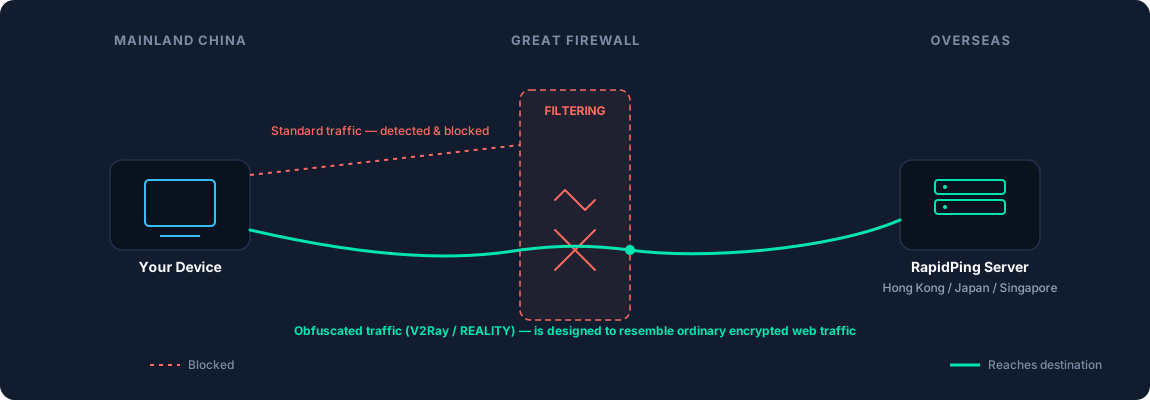
Why Accessing the Internet in China Is Unique
In mainland China, internet access is filtered in several ways. Some websites and apps are blocked, and some VPN connections can be detected and disrupted.
This is why a VPN that works well in Europe or the US may not work reliably in China, unless it uses connection methods designed to make its traffic harder to identify.
Note: V2Ray/Xray is not a traditional VPN protocol. It is a technology used to route and disguise internet traffic, which can make it more suitable for restrictive networks.
Which Websites and Apps Are Blocked in China?
Many popular global platforms are unreachable on mainland Chinese Wi-Fi networks and local SIM cards.
Commonly Restricted Platforms
Services commonly restricted on mainland Chinese networks include Google services (Search, Gmail, Maps, Drive), YouTube, WhatsApp, Instagram, Facebook, X (Twitter), Telegram, Wikipedia, and many international news websites.
Platform Restrictions Change
The status of specific IP addresses and domain names can change over time. What remains accessible one day might experience temporary or permanent filtering the next. Testing your communication tools beforehand is recommended.
What Makes a VPN Good for China?
Instead of focusing on brand names, look for these six key features.
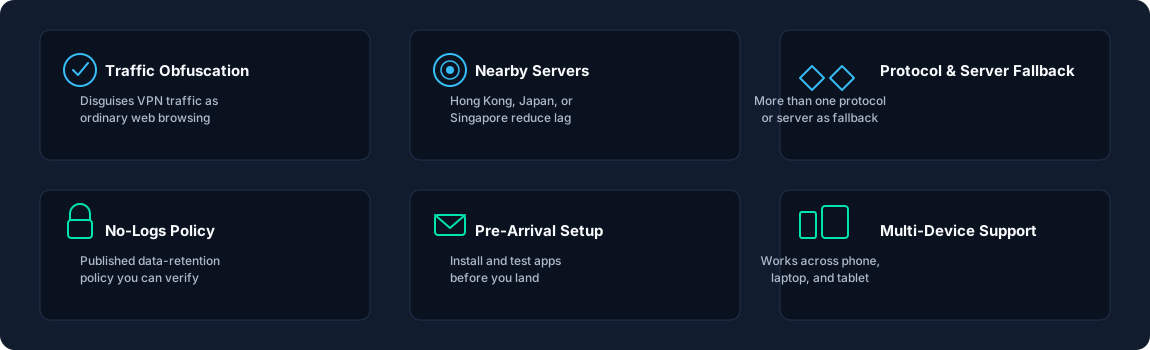
Core Evaluation Criteria for China
Look for these key features when picking a connection option for your trip.
Traffic Obfuscation
Look for connection methods designed to make VPN traffic look like ordinary web browsing. Xray/V2Ray with REALITY is one modern example built for restrictive networks.
Nearby Servers
Connecting to servers near mainland China—such as Hong Kong, Japan, or Singapore—can help reduce lag, though actual speeds depend on network traffic and routing.
Multiple Connection Options
Network conditions change constantly. Having more than one connection method or protocol gives you a backup option if one stops working.
Pre-Arrival Setup
Access to many VPN websites, subscription portals, and app listings may be restricted inside China. Setting up your apps and saving server configurations before you fly is essential.
Multi-Device Support
Confirm the service works on every phone, laptop, or tablet you plan to use.
VPN vs. Travel eSIM / International Roaming
Understanding how traffic is routed on mobile networks in China.
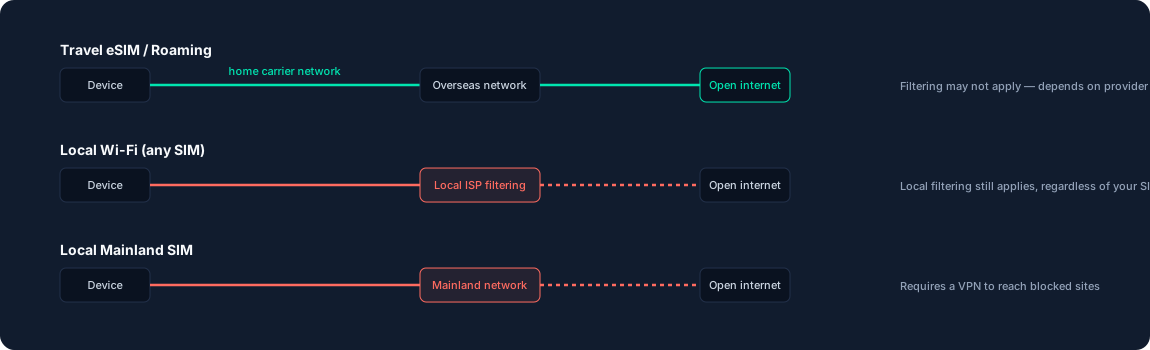
A common question from travelers is whether a travel eSIM replaces the need for a VPN. The short answer depends on how you connect:
- Travel eSIM / Roaming:May route your mobile traffic outside mainland China, depending on the provider's network setup.
- Local Wi-Fi: Goes through local Chinese networks, so filtering still applies even if you have a travel eSIM.
- Local SIM Card: Routes your mobile data through local mainland networks, so you may need a VPN to access blocked sites.
A travel eSIM may help when you are using cellular data, but it does not automatically bypass filtering when your device connects to local Wi-Fi.
Before You Fly: Your 6-Step Checklist
Complete these steps before arriving in mainland China to stay connected.
Choose a service
Pick a provider that offers connection methods built for restrictive networks.
Install apps on all devices
Set up the client software on every laptop, phone, and tablet you are taking.
Save backup server settings
Download server credentials or manual config files so you have them offline.
Log in before departure
Open your app and confirm you are signed in before boarding your flight.
Test protocol switching
Learn how to switch servers or change connection modes inside the app.
Save support contact info
Keep customer support email addresses or guides stored locally on your device.
What to Do If Your Connection Drops
1. Switch Connection Mode
If standard connections stall, toggle your app settings to an obfuscated mode such as V2Ray/REALITY rather than default connection protocols.
2. Try a Different Server
If a specific location in Hong Kong becomes slow or drops, switch to another nearby region like Japan or Singapore.
3. Try a Different Network
Switch between Wi-Fi and mobile data. Sometimes local Wi-Fi networks block connections that mobile networks allow, or vice versa.
4. Refresh Your Server List
If your provider supports server list updates, refresh your subscription settings while using mobile roaming or a temporary working network.
Common Misconceptions About China VPNs
Any standard VPN app will work reliably in China.
Reality: Automated network filtering can detect and disrupt some VPN traffic, particularly when recognizable traffic patterns or endpoints are identified. Reliable access usually requires connection modes designed to disguise VPN traffic as ordinary web browsing.
Using a VPN is completely illegal for foreign visitors in China.
Reality: China regulates VPN and cross-border internet services strictly. Rules and enforcement can change, so travelers and residents should check current official guidance and comply with local law. Read our guide: Are VPNs Legal?.
If a server disconnects once, the VPN is blocked permanently.
Reality: Temporary IP disruptions happen regularly. Changing servers, toggling ports, or switching connection protocols inside your app often restores access.
Frequently Asked Questions
What type of VPN works best in China?
There is no single option that works all the time. Connections designed to make VPN traffic harder to identify, including some Xray/V2Ray configurations using REALITY, can be more suitable for restrictive networks. However, network conditions can change at any time.
Is it legal to use a VPN in China?
China regulates cross-border network services and VPN-related activities, and the rules can depend on the circumstances and applicable regulations. Travelers should check current official guidance and comply with local law.
Should I set up my VPN before traveling to China?
Yes. Most VPN websites, subscription portals, and app store listings are unreachable behind mainland networks. Setting up and testing your tools before departure is strongly recommended.
Can a VPN suddenly stop working in China?
Yes. Network filtering and server conditions can change over time, so a connection that works today may become unreliable later. Having alternative servers or protocols gives you options, but no provider can guarantee uninterrupted access.
Does a travel eSIM replace the need for a VPN?
A travel eSIM may route mobile traffic outside mainland China, depending on the provider, but it does not automatically bypass filtering when your device connects to local Wi-Fi networks.